Monday, September 10, 2018

Search restaurants and book tables, Booky App is here!

Booky is a mobile app that lets you search restaurants, book tables, and get exclusive discounts and it works OFFLINE…

Yes, it works OFFLINE

Making a reservation was quick and easy compared to the usual way of getting the contact information with the help of Booky app.

Booky app is quick and easy to use to contact the restaurant in Manila for a reservation and very convenient. It helps the Filipino especially food lovers to discover a new restaurant. It is like having a personal directory of many restaurants and gives you a FREE DISCOUNT or DESSERT when you BOOK A TABLE via SMS.

App
Image credit to Booky

Booky Prime is a membership subscription that lets you book a table with discounts up to P500 off your bill (subject to a P1000 minimum spend) and also get exclusive BUY 1 GET 1 coupon over 900 partner restaurants in Metro Manila. – Booky FAQ

App
Image credit to Booky

Also read: How to buy on Lazada Philippines

How to Book:
  1. Search for the restaurant you like with Prime badge  (means the restaurant is tied up with Booky and may have discounts available)
  2. Pick the time and discount you like then send your booking request
  3. You will receive an SMS booking confirmation within 5 minutes
  4. Go to the restaurant and show your SMS confirmation
App
Image credit to Booky


HOW TO CLAIM BUY 1 GET 1?
  1. Approach restaurant staff when you are ready to order
  2. Swipe to claim your coupon
  3. Show this voucher on your phone before the 10min timer finishes
(You can only claim Buy 1 Get 1 coupons by using the mobile app)

No need to purchase vouchers online, and wait for someone to answer then reserve, with the help of Booky you can get coupons and use it without hassle.

Booky is a local app founded by Filipino-British entrepreneur Ben Wintle.”

What is the story behind Booky App?

Ben Wintle and his girlfriend Iza Calzado loves to eat however because of the poor internet connection here in the Philippines, it was so hard to find a restaurant and that is a problem. Ben decided to build an app called Booky even without internet connection for Filipino who experiences the same problem.


Explore RESTAURANTS and enjoy DISCOUNTS!!! Try this app now

This app is made for food lovers, by food lovers and you can download it for FREE on the App Store and Google Play.

For any concerns, you may reach at prime@phonebooky.com

Thursday, September 6, 2018

Affordable Internet access at Home

Home Prepaid Wi-Fi is the new way to have internet access at home. With these, you can enjoy watching your favorite online video; Access your social media account, do researching and even playing games right at your home without paying bills monthly.

Globe PLDT
Globe and PLDT Home Wi-Fi


Globe and PLDT release a plug and play device for Filipino to enjoy the internet and can connect up to 5 devices. The device already has sim card where you need to load it and register to a promo, LAN Cable and power adapter.


Globe Home Prepaid Wi-Fi is color with Globe name in front of it. There are LED lights indicators at the front for power, internet, wireless, LAN, and signal. At the top, a button that looks like a reset button and also grills for ventilation.

At the back, you will see the single LAN port, NTC sticker and power port and the guide on How to Load and surfing promos were you can subscribe. The mobile number is also written at the back.

Data Promos exclusive for Prepaid Wi-Fi Subscribers

HomeSURF15 = P15 / 1GB / 1 day

HomeSURF349 = P349 / 10GB / 10 days

HomeSURF599 = P599 / 15GB / 15 days

Globe at Home Prepaid Wi-Fi is 2x faster and stronger signal coverage vs. POCKET WIFI. It works best in Globe LTE Area.


Also read: App that is suitable for Filipino commuters in Manila


PLDT Home Prepaid Wi-Fi is similar to the Globe Home Prepaid Wi-Fi. A plug and play device that connects up to 5 devices such as a smartphone, tablet, and laptop. You can also connect your Desktop with the use of LAN cable. PLDT Home Prepaid Wi-Fi is powered by SMART LTE.

It is color black and like the Globe Home Prepaid Wi-Fi, it has LED lights for power, LAN, WIFI, and the signal at the front. You can load the device in any SMART loading station nationwide.

Latest LOAD promo:


HOME BOOST 15 = 1GB for 1 day

HOME BOOST 50 = 1.3 GB for 3 days

HOME BOOST 100 = 3GB for 1 day

HOME BOOST 349 = 10GB for 10 days

HOME BOOST 599 = 15GB for 30 days

PLDT Home Prepaid Wi-Fi works best in Smart LTE Area


Both Globe and PLDT Home Wi-Fi have FREE 10GB upon activation valid for 7 days.

Grab your Globe Home Prepaid WiFi for only P1,999 and PLDT Home WiFi for only P1,995.

This is a budget-friendly internet provider for the family and friends. The speed of the internet depends on your location, check first your location if LTE Coverage.


You can buy Globe Device at Globe Shop and Lazada while the PLDT Device is on PLDT Shop

Monday, August 20, 2018

Medical professionals on call through Aide App

A big help nowadays is an app that you can rely on like emergency situations. Imagine, early morning your daughter/son wakes up with a high fever and you need immediately a doctor but didn’t know if available? Travel to the hospital and waiting for the doctor to arrive is a big hassle. But now, with the help of Aide, you can contact a doctor to arrive at your house, a very big help.

Aide is a booking app in the Philippines where you can book an appointment for medical professionals to come to your house. You don’t need to go to the hospital and wait like other sick patients do; Aide app will bring the doctor to your house with the help of a smartphone.

App
Aide App

Users need to write down their profile together with the medical history of their family.
Users also need to choose and click the services they need, check the profile of medical practitioners including the rating and book an appointment.

The power of technology and medical practitioners are now together for the Filipino by Aide App.


How to use Aide Professional App:
  1. REGISTER (you need to register on aide website and fill the required details)
  2. CHOOSE (choose on the list of appointment on the app where you can attend)
  3. SET (set your professional fee)
  4. BOOK (book an appointment on the app and wait for the patient to choose the professional)
  5. CHECK UP (checkup time – you need to go to your patient and provide them the treatment and care they need and accept payment after the appointment)

For those who want to be part of Aide:

Aide App


Some Services offered by Aide:
  1. HOME CARE 
  • Medical ( the doctor will come to you with a complete checkup at your home)
  • Nurse (Filipino nurse will provide you care you need)
  • Physical Therapist (professional and licensed physical therapist at your home)
  • Vaccines (vaccinations to you and your family without leaving your home)
  • Glutathione (not just whitening but also provide benefits for your health)
  • Alternative medicine (give you alternative medicine like acupuncture)
  1. ANIMAL CARE
  • Pet Vaccinations (veterinarian will come to give vaccines to your pet)
  • Pet Grooming (pets also need groomer)
  1. LABORATORY
  • Diagnostics (laboratory tests done at your home)
  • Interpret my Labs (doctors will interpret your lab results for you)
  1. MEDICINE DELIVERY
  • Prescription (prescriptions are available for delivery)
  • Over-the-counter (order your meds over the app and wait in at your home)
  • Medication Counseling (talk to a licensed pharmacist about your meds anywhere)
  1. CHAT
  • Live Chat (chat to a licensed medical professional
  • Telehealth (consult a doctor anytime, anywhere with the help of KonsultaMD)
  • Aide Hotline (For any concerns, contact aide hotline 24/7)
They also have an AMBULANCE coming soon…

Aide App
Image credit to Inquirer.net
The story behind Aide App

The Bugayong siblings are the one behind the concept and development of Aide app because they tried to look for a nurse for their grandmother. Paolo Bugayong, Dr. Patrick Bugayong, and Pamela Bugayong-Donato, together they form the APPPPS Partners Inc and released the app 2016.

This is a great app and it helps and saves a lot of Filipino lives. The concept of making this is good. It provides care right at your home with the help of your smartphone. You don’t need to leave your house and travel to the hospital, because the doctors now are one call away by Aide.
This is a big change in the lives of Filipino now and in the Future.

The App is available in Google Playstore and App Store

For further questions, you may contact Aide info@aide-app.com

Address:  175 Katipunan Ave, Bayanihan, Quezon City, 1109 Metro Manila

Contact number:  09178068478 / 09265201665

Facebookhttps://www.facebook.com/aideapp

Instagramhttps://www.instagram.com/aideapp


App that is suitable for Filipino commuters in Manila

Did you always commute going to your destination? Didn’t know what kind of vehicle you need to and how much it cost?

Have you heard the app called Sakay.ph?

It is an app developed to guide the Filipino who always commutes in the Metro Manila.
This app helps you on how to go to your destination in different modes like Jeep/Bus, Premium Bus/P2P, MRT/LRT, UV Express, E-Jeep, and also Ferry. It gives you best directions in Metro Manila.

This app is like Google Maps that gives you directions to your destination but develop for commuters by recommending you the best routes.

Screenshot

Screenshot 2

The user-interface of the app is simple and easy to understand for the beginners…

screenshot 3
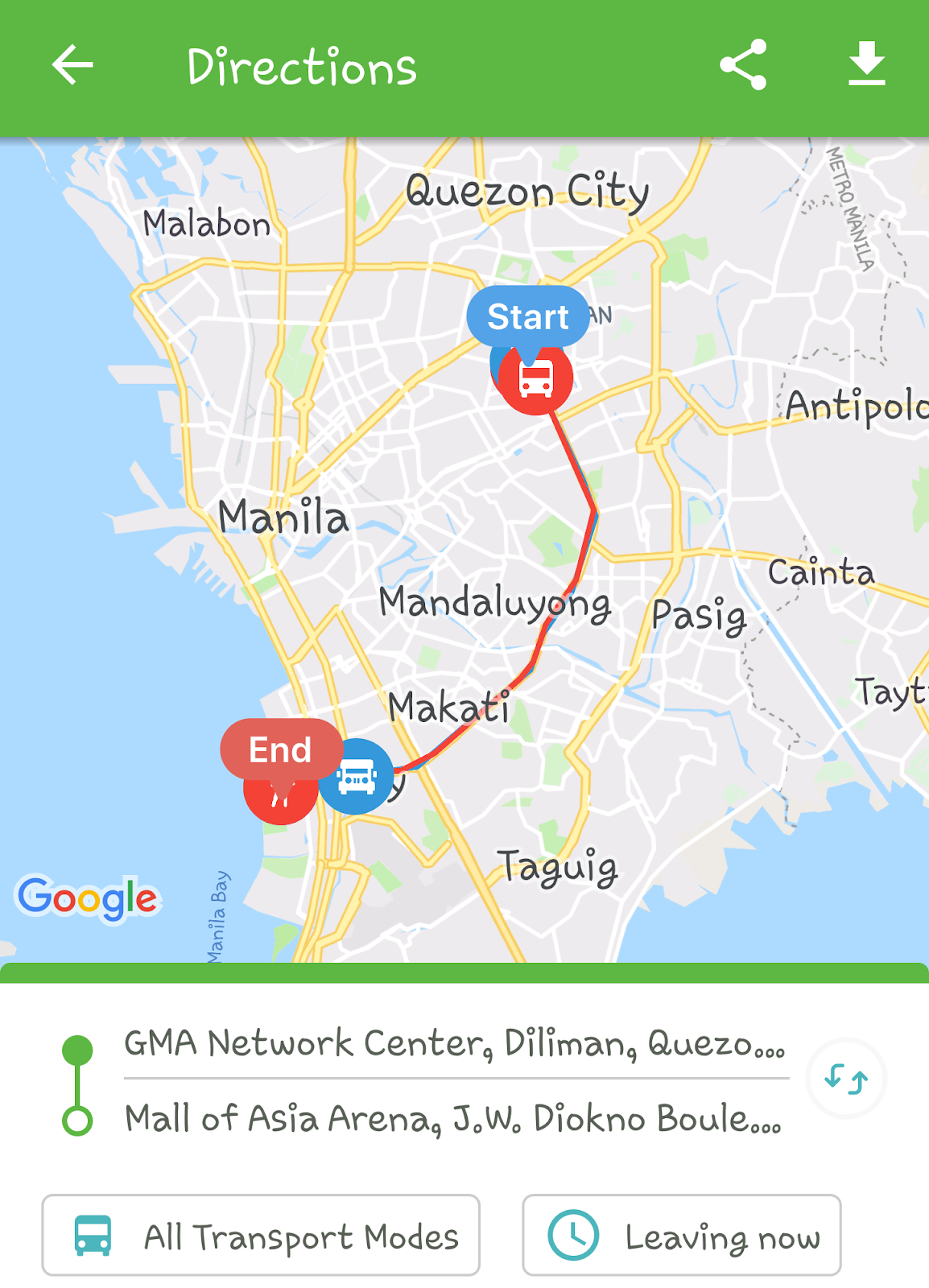
This picture is an example of suggested routes (from GMA Network Center to Mall of Asia Arena)

screenshot 4

You can also set your travel time…

screenshot 5


You can choose which transport vehicle you want in Mode Preferences...

screenshot 6
Read also the Commuting Guide…


What I like about the app is that it gives recommendation to your destination by showing the best routes and the prices for it. The app is easy to use and so light to the smartphone; it is not consume more spaces on your phone.

This app is suitable for Filipino who are new and didn’t familiar in Manila…

You can download the app on Google Playstore and App Store (for Android and IOS)


BeepBeep.ph- your 24/7 Online Directory for your car

Maintenance is important to your car for better performance and safety on the road when you travel. But, What if you stuck in the middle of the road and didn’t know any car service nearby?

Now, there is an online service platform for car owners that will help you, BeepBeep.ph your assistance on the road 24/7.

App
Image credit to BeepBeep.ph
BeepBeep.ph gives you access to a directory over 7,000 car-servicing establishments within Metro Manila. It helps the car owners to find automotive services like;
  • Car Wash and Detailing
  • Wheels and Tires
  • Maintenance and Mechanical Repairs
  • Insurance and LTO
  • Body Repairs, Paints and Wraps
  • Battery and Towing
  • Parts and Accessories
If your problem doesn’t match the categories above, all you have to do is contact BeepBeep experts, just submit your contact details and your message.

App
Image credit to BeepBeep.ph

They also offer Service Valet; a booking system which you can set an appointment for your card needs. They pick your car from your house then brought to a car service shop and deliver it to you after the service.

The company currently has 60 professional and well-trained drivers so you don’t have to worry about your car driven by a stranger.

Also read: How to buy on Lazada Philippines


BeepBeep.ph partner car servicing shop is located in;
  • Taguig
  • Pasig
  • Marikina
  • Manila
  • Quezon City
  • Pateros
  • Pasay
  • San Juan
  • Las Piñas
  • Makati
  • Mandaluyong
  • Caloocan
  • Navotas
  • Valenzuela
  • Malabon
  • Muntinlupa
  • Parañaque
The company provides reviews of service centers for the car owners to choose the right and trusted shops for their car.

Users can also suggest service centers, local garage or repair shops to BeepBeep.ph and they will review it before adding this to their directory.

Payment Option
They accept cash or credit card, PayPal and PayMaya too...


Also read: Medical professionals on call through Aide App


App
Image credit to BeepBeep.ph
Roadside Assistance

BeepBeep.ph offers road assistance open 24/7 for your car in case you stuck in the road and need help like towing your car, just dial (02)541 9999

If you want the company to call you, go to BeepBeep.ph and submit your name, mobile number, your location and the service you want.

Anton Ojeda and Paolo Acosta the founder of BeepBeep.ph


An efficient car service that will help you with your car and you don’t have to worry or wait for your car in car shops.
The site is easy to use and user-friendly so you don’t have to ask someone help.
Every car needs tender loving care like maintenance to prevent the problem on the road


BeepBeep.ph is also available in Google PlayStore and App Store

Share this to your family and friends and tell them how awesome BeepBeep.ph is.


Need help to do your errands? MyKuya app is here for you

Do you want help to do your errands? So many things to do, but don't have enough time to do it all...

Buying your favorite food, delivering a package, helping you clean your house, payment of bills, and get your groceries? "MyKuya app" can help you!

MyKuya, Your helping hand on-demand is a mobile app developed to help the Filipino. This app lets you hire someone to help you with Php49 for every 30 mins of service. MyKuya provides job opportunities for anyone who wants.


"Majority of the use-cases have been around food delivery from restaurants that don't usually deliver, looking for items to purchase in stores and malls, cleaning and dishwashing, payment of bills and even pet-sitting or representing our customers to do task at government offices and agencies, like retrieving a confiscated driver's license with authorization letter from LTO," Machine Ventures CEO Shahab Shabibi said in an e-mail interview to Entrepreneur.ph

App
Image credit to MyKuya

Also read: How to buy on Lazada Philippines


Users can request KuyaNOW (Male partners who can do the task on foot), AteNOW (Female partners who can do the task on foot) and KuyaMOTO (Male partners who can do the task on the bike).
  1. AteNOW/KuyaNOW: ₱49 per 30mins
  2. KuyaMOTO: ₱89 per 30mins
This service fee will be charged from your chosen payment method (i.e. card) after fulfillment of your request. In addition, you will have to reimburse the MyKuya Partner if there are any costs associated with your order. For example, when the request is Grocery shopping, the partner will bring the receipt upon delivery and you will have to repay him/her in cash - MyKuya

App
Image credit to MyKuya

The app matches users in need of help to the right service personnel to do the job. After getting the match, users can now begin to chat with the service personnel to discuss the job and you can track the progress of the job until it's been completed.


Also read: App that is suitable for Filipino commuters in Manila


Some people use MyKuya app to hire waiters and bartenders...


App
Image credit to MYKuya

“We enable our partners to work on their own schedule and location to enable convenience at work. Our technology enables data-driven insights for our partners to maximize their earnings,” Shabibi said.

The app only requires aspiring partners to provide basic requirements such as government-issued IDs, National Bureau of Investigation (NBI) Clearance and Barangay Clearance to become part of the platform.

App
Image credit to MyKuya

MyKuya helping hands only come when you need their services. You only pay for the time you utilized them. There is a MyKuya service for every task you need to accomplish.

App
Image credit to MyKuya

MyKuya is founded by Machine Ventures, a Manila-based company builder established by Shahab Shabibi and Farouk Meralli.

Get the app now from Google Playstore and App Store...


If you have any further questions, please ask hello@mykuya.com


Tuesday, June 26, 2018

Life Hacks for Daily Use

$*#@%$ ca-app-pub-1137779481600990/5267808203


# You can use Google as a timer by typing "Set timer (x) minutes" into the search bar. 

# Drinking two cups of water before meals can make you lose an average of 4.5 more pounds within 12 weeks than if you don't.


#If you type in any flight number into Google you can see exactly where the plane is.


#11 Stress Relieving Foods -Bananas -Pasta -Almonds -Grapes -Green Tea -Oatmeal -Chocolate -Water melon -Orange Juice -Cornflakes -Tuna

There are a lot of advices when it comes to stopping those annoying hiccups - holding your breath and eating sugar and what not. When you get hiccups, simply bend forwards and drink a glass of water from the other side as demonstrated in the picture. It will cure the hiccups immediately by restricting the spasmodic inhalation characteristics of hiccups.

While traveling abroad, you can use Google Maps as a free GPS without an international data plan. While offline, simply zooming to a map area you want in the maps app, and type “ok maps” into the search box. This data will be available even when you do not have data connectivity.


Replace "YouTube" with "listentoyoutube" in the URL to download the audio of the video.

. Replace "YouTube" with "ssyoutube" in the URL to download the video in any quality available.
. Replace "YouTube" with "nsfwyoutube" to bypass age restriction.
. Replace "YouTube" with "youtubeskip" in the URL and you won't see ads.
. Replace "YouTube" with "listenonrepeat" in the URL to repeat the video automatically.

Thursday, May 17, 2018

Working with Images In Android


Working with Images


Images are used to make the user interface interactive and more user friendly. Images can be used with almost all the widgets like TextView, EditText, Buttons, ImageButtons etc.
To use the images we need to create a “drawable” folder in “res” folder and put all the images in this “drawable” folder.
Demo App : “Working with Images”


What we will do : We have five images named “one”, “two”, “three”, “four” and “five”.


We have five buttons on main screen named  “One”, “Two”, “Three”, “Four” and “Five”.
When clicks on a particular button, we will show the respective image in Image View using  method setImageResource(resourceId);

main_activity.xml
<LinearLayout xmlns:android="http://schemas.android.com/apk/res/android"
    android:layout_width="fill_parent"
    android:layout_height="fill_parent"
    android:orientation="vertical" >
   

   <LinearLayout
    android:layout_marginTop="30dp"
    android:layout_width="fill_parent"
    android:layout_height="wrap_content"
    android:orientation="horizontal" >
   

    <Button
        android:id="@+id/buttonOne"
        android:layout_weight="1"
        android:layout_width="fill_parent"
        android:layout_height="wrap_content"
        android:text="One"
        android:onClick="showOne"/>
    
     <Button
        android:id="@+id/buttonTwo"
        android:layout_weight="1"
        android:layout_width="fill_parent"
        android:layout_height="wrap_content"
        android:text="Two"
        android:onClick="showTwo" />
    
     <Button
        android:id="@+id/buttonThree"
        android:layout_weight="1"
        android:layout_width="fill_parent"
        android:layout_height="wrap_content"
        android:text="Three"
        android:onClick="showThree"/>
    
     <Button
        android:id="@+id/buttonFour"
        android:layout_weight="1"
        android:layout_width="fill_parent"
        android:layout_height="wrap_content"
        android:text="Four"
        android:onClick="showFour" />
    
     <Button
        android:id="@+id/buttonFive"
        android:layout_weight="1"
        android:layout_width="fill_parent"
        android:layout_height="wrap_content"
        android:text="Five"
        android:onClick="showFive"/>
    
   
    </LinearLayout>
   
    <ImageView
        android:id="@+id/imageView1"
        android:layout_marginTop="50dp"
        android:layout_width="200dp"
        android:layout_height="200dp"
        android:layout_gravity="center_horizontal"
        android:src="@drawable/one" />
   
</LinearLayout>

MainActivity.java
public class MainActivity extends Activity
{
    ImageView myImageView;
       @Override
       protected void onCreate(Bundle savedInstanceState)
       {
              super.onCreate(savedInstanceState);
              setContentView(R.layout.activity_main);
             
              // get the reference of image view
              myImageView = (ImageView)findViewById(R.id.imageView1);
       }

      
       /* when user clicks on Button "One"
        * set the particular image in myImageView
        */
       public void showOne(View V)
       {
              myImageView.setImageResource(R.drawable.one);
       }
      
       /* when user clicks on Button "Two"
        * set the particular image in myImageView
        */
       public void showTwo(View V)
       {
              myImageView.setImageResource(R.drawable.two);
       }
      
       /* when user clicks on Button "Three"
        * set the particular image in myImageView
        */
       public void showThree(View V)
       {
              myImageView.setImageResource(R.drawable.three);
       }
      
       /* when user clicks on Button "Three"
        * set the particular image in myImageView
        */
       public void showFour(View V)
       {
              myImageView.setImageResource(R.drawable.four);
       }
      
       /* when user clicks on Button "Five"
        * set the particular image in myImageView
        */
       public void showFive(View V)
       {
              myImageView.setImageResource(R.drawable.five);
       }

}


Screenshots
             
     Main Screen(When nothing selected)                           When Button “One” Selected

        
          When Button “Three” Selected                               When Button “Five” Selected