Thursday, November 29, 2012

Use Google Offers to help you save while having fun during the holidays

As always, this holiday season you are probably juggling multiple things: family to feed, out of town guests to entertain, presents to buy, all without breaking the bank! Google Offers wants to help you achieve that to-do list with maximum convenience and savings. Which is why we are excited to announce a new revamped Google Offers site that makes it easier to discover great offers from the brands you love. Offers are now presented in ten popular categories, including food & drink, shopping and travel, to help you quickly discover great deals that match your interests and needs.

Browse through the categories on the Offers site to find offers relevant to you


Save and quickly redeem the offer directly on your Android device


Posted by Robert Kim, Product Manager, Google Offers

Thursday, November 15, 2012

Google Shopping goes global

On May 31, we announced a new initiative to improve our shopping experience over time. We designed this initiative to help shoppers better research purchases, compare different products and their features and prices, and then connect with merchants to make their purchases.

As part of this new initiative, called Google Shopping, we transitioned Google Product Search in the U.S. to a commercial model built on Product Listing Ads. We made this transition because we believe that having a commercial relationship with merchants will lead to better, more up to date product data — which will mean better shopping results for users and in turn, higher quality traffic for merchants.

We completed the transition in the U.S. on October 17 and have seen a great deal of success so far.

Google Shopping — International rollout
With that success in mind, we are pleased to announce that we are rolling out this commercial model for Google Shopping, built on Product Listing Ads, in the United Kingdom, Germany, France, Japan, Italy, Spain, Netherlands, Brazil, Australia and Switzerland. We think this will bring the same high-quality shopping experience to people — and positive results to merchants — around the world.

In order to give merchants time to make this transition and optimize their campaigns, we're rolling out the new model gradually, via several steps. The first major change will take place on February 13 2013, when visually cleaner results for shopping queries, including some new commercial formats on Google.com  that will display products in a single unit, will replace current search results. These new commercial formats will be labeled as "Sponsored" and appear in the space currently occupied by Adwords ads.

These visually cleaner results for shopping queries will enable shoppers to refine a search by brand or price, and feature larger product images to provide a better sense of a product's attributes. Starting today, we'll begin testing this new format for a small percentage of searches.

The transition to the commercial model will be complete by the end of Q2 2013. We'll also be offering some incentives; details will follow, on this blog and via email, in the coming weeks.

To learn more and get started, merchants can visit
http://support.google.com/adwords/bin/answer.py?hl=en&answer=2456103 

Ranking in Google Shopping, when the full transition is complete in the countries listed above, will be based on a combination of relevance and bid price.

A better shopping experience
These changes will create a better shopping experience that will benefit both shoppers and merchants. Shoppers will find products in one convenient place and quickly be able to compare features, find the best prices, read reviews, and identify great merchants — while advertisers will be given more granular control over product listings and traffic.

We look forward to continuing to evolve the experience with the help of our merchant partners, to help people find what they're looking for at lightning speed — and to help businesses of all sizes reach people at the moment of interest, with helpful information.

Posted by Sameer Samat, Vice President of Product Management, Google Shopping

Wednesday, November 14, 2012

Deck the halls with tools for shopping

I love shopping for gifts for my family and friends, but it’s not always easy. Fortunately, the Google Shopping team has built several new tools to help you (and me!) get an early and stress-free start on holiday shopping.

Explore products in 360-degree detail on Google Shopping
Having trouble imagining what a toy actually looks like from the online picture? Now, when searching for toys on Google Shopping, you can see 360-degree photos of the products. These interactive images bring the in-store feeling of holding and touching a product to your online browsing.

Look for the “3D” swivel icon on the product image to see the toy in 360-degree view, on HTML5 enabled browsers. We’ve also put together a Holiday Toy Collection featuring this enhanced imagery—explore the collection on this site. 360-degree imagery is coming for other types of products soon.


If you’re a retailer or manufacturer interested in displaying these rich images of your products on Google Shopping, please fill out this form.

Use Shortlists to stay organized and collaborate with friends
New in Google Shopping, Shortlists make it easier to research products and plan purchases with friends and family. Instead of using bookmarked websites and docs containing long lists of URLs, or back-and-forth emails with friends, you can now consolidate all your shopping research in one place. With Shortlists, you can easily:
  • Keep track of products you like from Google Shopping and across the web
  • View product photos, prices and specs side by side
  • Share your Shortlist with friends, who can add their own ideas


Create a Shortlist by visiting google.com/shopping/shortlists or clicking the “Add to Shortlist” button as you browse products on Google Shopping.


Discover great deals and store promotions on Google Shopping
To help you make the most of your holiday budget, Google Shopping now shows discounts or promotions on the products you're viewing. If discounts or promotions are available, you can click on the link and visit the retailer’s site to redeem the offer.


That’s not all...a few more new Google Shopping features
Here are a few of the other tools we’ve created to make your holiday shopping a little easier:
  • Not sure you’ve found the perfect gift? Read reviews from people you know and write your own product reviews on Google Shopping.
  • Found an item that’s almost perfect but not quite? Now you can view “visually similar” results for even more types of products and categories, including jewelry, coats, handbags and more.
  • Buying an important gift? Look for the Google Trusted Store logo as you shop. It indicates a store ships quickly and delivers excellent customer service.
  • Shopping on the go? Browse for gift ideas, find local sales and research products with the new and improved Google Shopper 3.0, currently available for Android.
  • Still need some inspiration? Browse holiday catalogs from the top retailers directly on Google Shopping.
Happy holiday shopping!

Tuesday, November 13, 2012

See more relevant reviews and share feedback with your friends on Google Shopping

Reading product reviews has become an important part of how people research products and decide what to buy; in fact, last holiday season, 67% of shoppers read product reviews before making a purchase. This means that it’s more important than ever to give users the ability to quickly find the reviews they trust the most -- those from friends and family.

So today, we’re announcing two new Google Shopping features that help savvy shoppers better find the reviews that will best help them make shopping decisions. The first feature lets you see if a product you’re looking for has been reviewed by someone you know. The second enables you to write product reviews on Google Shopping, to help friends and other Google users make smart purchases.

Read reviews from people you know
Now you can easily see if someone you've connected with on Google has reviewed a product that is in your Google Shopping search results. 
See reviews from people you know in your Google Shopping search results
When you click on a particular product and scroll down to the ‘Reviews’ section, reviews from your friends and contacts will appear at the top of the list.
Reviews from friends and contacts appear at the top of the "Reviews" section

Share your own reviews
We’ve also made it easy to write your own product reviews on Google Shopping. To write a review, login with your Google+ account, click on the product you’d like to review, then click the ‘write a review’ button at the top of the page. 

Click 'Write a review' when viewing a product on Google Shopping
Rate the product, write your feedback, and click 'Publish'
Once you submit your review, it will be publicly available to anyone who views that product on Google Shopping.   You can also choose to post your review to your Google+ stream.
You can choose to share your review in your Google+ stream
And, of course, when people who are connected to you search for or click on that product, your review will be highlighted.

Happy Shopping!

Posted by Karen Corby, Product Manager, Google Shopping


Saturday, November 10, 2012

Google Shopper 3.0 - New features to help with your holiday shopping

As you hit the mall this holiday season, chances are you’ll be accompanied by a reliable personal shopping companion: your mobile phone. Four out of five mobile phone and tablet owners plan to use their device for holiday shopping - for comparing prices, locating nearby stores, and searching for coupons. Today, with the launch of Google Shopper 3.0 for Android, you can easily browse for gift ideas, research products, and locate great deals on the go.

Search for products and get gift ideas on the redesigned home page
The app’s redesigned home screen features a bigger search box for easier navigation. When you browse curated gift ideas and latest trends on the home page or search for apparel and accessories, larger photos let you view product designs in more detail.


Find great sales and special offers with Google Shopper
Shopper now makes it quick and easy to find great deals at local and online stores. From the new Sales page, you can view weekly circulars from nearby stores, along with a handful of featured current promotions which you can redeem online or in person. Shopper also shows you store promotions, such as ‘30% off’ or ‘free shipping’, as you search for products in the app.

      
Find great deals on the new Sales screen and as you search for products    

Use GoodGuide rating to Identify healthy, safe, and eco-friendly products
Whether you shop with a conscience or would like a reason to start, Shopper now features GoodGuide ratings, a rating system that indicates on a scale of one to ten whether a product is healthy, safe and environmentally friendly. When GoodGuide ratings are available for a product, you can view these by scrolling down the product detail screen, as shown below. You can learn more about the GoodGuide rating system here.

GoodGuide product ratings


You can download Shopper 3.0 for your Android device from Google Play.

Posted by John Shriver-Blake, Product Manager, Google Shopper


Thursday, November 1, 2012

Save time when purchasing things on your phone with Google Wallet

Making purchases on your mobile phone can be a lot easier. Starting today, on sites that accept Google Wallet, you don’t need to enter your credit or debit card number, billing address or other payment information — it’s already securely stored in your Google Wallet.


Typically, on mobile websites, you need to key in 17-20 fields of information on a small screen while having to click and scroll through multiple pages to provide shipping and billing information. It’s no wonder up to 97% of mobile shoppers abandon their mobile shopping carts. Google Wallet makes it easy and secure for you. Simply click the Buy with Google Wallet button, log into Google Wallet and click to complete your order. That’s it — you’re done in 3 steps.

With Google Wallet, you can buy flowers and gifts at 1-800-Flowers.com quickly and easily on your mobile phone. You can also use Google Wallet to buy on Rockport.com and FiveGuys.com (at select locations).

With Google Wallet you can:

  • Pay without entering your credit or debit card number, billing address, or other payment information — it’s already securely stored in your Google Wallet.
  • View your credit and debit cards, shipping addresses and transaction history conveniently in one place at wallet.google.com/manage.
  • Set a default card for future purchases on your Google Wallet account, making future transactions even faster.
  • Shop with confidence as all your payment and related information is encrypted and stored on secure servers and not shared with anyone.

Limited time — Save money at 1-800-Flowers.com and Rockport.com

Not only does Google Wallet save you time, it can also save you money. For a limited time, buy with Google Wallet on your mobile device and get $10 off at 1-800-Flowers.com and $20 off at Rockport.com (some restrictions apply).

We are working with a number of other exciting retailers to integrate Google Wallet on their mobile sites, including Finish Line, MovieTickets.com, Seamless, SwimOutlet.com and more, so stay tuned for more announcements.

Posted by Barak Turovsky, Head of Mobile Commerce, Google Wallet

Thursday, October 18, 2012

Showcase your promotions and get your customers’ attention

Shoppers are savvier than ever. They use social recommendations, web searches and smartphone apps to make informed purchase decisions. So how can a retailer stand out and get a shopper’s attention?

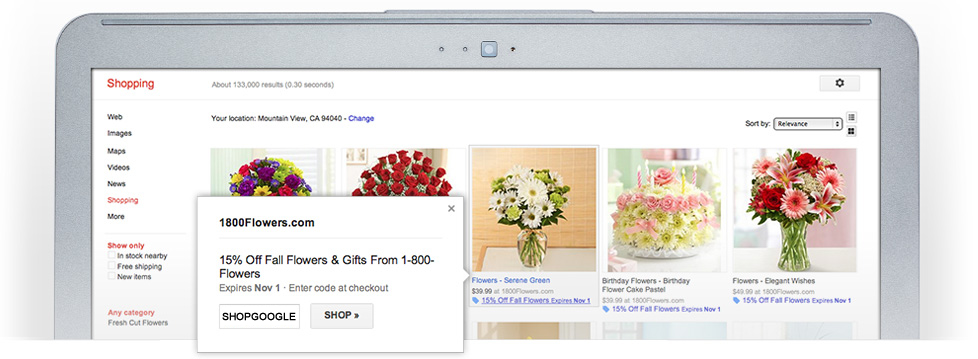
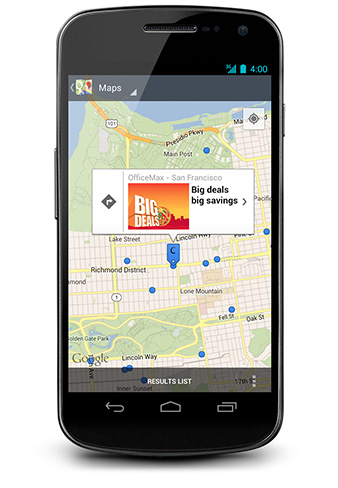
Today, we're rolling out a new way for retailers to reach shoppers at the moment of interest. Retailers can now add promotions to their product listings on Google Shopping to make them stand out. In addition, they can distribute their promotions on other Google properties such as Google Maps for Android and the Google Offers app, and attract shoppers to their store.


Promotions are highlighted in product listings on Google Shopping

In a few simple steps retailers can create a promotions list, map it to the right products in Google Shopping and upload to Google Merchant Center.  Our system supports user specific redemption codes and associated reporting, enabling retailers to measure the performance of each promotion.
 
Shoppers can see nearby promotions while searching in Google Maps for Android

This is one of the many steps we’re taking to provide traffic, technology and tools to help retailers grow their business. Over 25 well-known U.S. retailers, including 1-800-flowers.com, OfficeMax®, Inc., Tommy Hilfiger, Express, Chico’s, Overstock, Guitar Center, Drugstore.com and Wayfair, are already part of this program. In the coming months, we plan to expand the program to include more retailers. If you are interested in featuring your promotions on Google properties, you can learn more here.


Posted by Nitin Mangtani, Group Product Manager, Google Offers and Michaela Feller, Product Manager, Google Shopping

Tuesday, October 2, 2012

Google Shopping: transition update and new functionality in time for the holidays

Over the last 4 months, Google Shopping has been moving to a commercial model built on Product Listing Ads. One of the reasons we decided to make this transition was to get better data from merchants in order to build a better shopping experience for users. We are very pleased with the participation from retailers in our new model and many are starting to report success.

Starting on October 17, Google Shopping results in the US will come only from merchants who are Product Listing Ads advertisers. We will be ranking these results based on relevance, with bidding as an additional factor. The ranking of natural search results on Google.com will not change.

Help for the Holidays 


For merchants who have not yet made the transition, it’s not too late to get your products on Google Shopping and optimized in time for the holiday season. You can do so by signing up for Product Listing Ads; please visit www.google.com/ads/shopping for more information. For merchants attending SMX East in New York City this week, we would love to hear from you during the Google Shopping Q&A session on October 4 at 2:30 PM local time. We look forward to making ourselves available to answer any questions you may have regarding Product Listing Ads on Google Shopping.

For help optimizing your Product Listing Ads, check out our Google Shopping best practices guide or watch 
our optimization video. Additionally, we’ll be hosting a ‘Bidding Strategies for the Holidays’ Hangout on Air on October 19 at 10:00am PST. Visit the Ads Google+ page to join the Hangout.

A New Way to Optimize Campaigns

We’ve gotten a lot of requests for tools that make it easier to manage campaigns at a more granular level, so we’re pleased to announce the availability of 
product level bidding. This addition to the Product Listing Ads toolkit will help merchants during the holiday season and beyond in a number of ways.
  • Optimize bids for individual products. You can now improve your Product Listing Ad performance by setting your cost per click bid at the item level. This functionality should help you meet your volume and profit targets at the product level.
  • Easily create product targets. It is now possible to create product targets using the product ID in your Merchant Center feed to manage your bids at the product level.

We believe this feature will create new opportunities for optimization by allowing you to easily target individual products, and will help you make the most out of your Google Shopping campaigns.

For more information on product targets please visit the AdWords Help Center.

We look forward to releasing more tools and features i
n the coming months to help you reach new customers on Google Shopping. Stay tuned!

Posted by Sameer Samat, Vice President of Product Management, Google Shopping

Monday, October 1, 2012

Browse your favorite catalogs on the web

Last year we introduced Google Catalogs, giving shoppers a rich, new way to browse and explore their favorite catalogs on a tablet device. Since then, Google Catalogs has grown to become one of the largest collections of digital catalogs, featuring thousands of issues from over 300 retail brands, including catalog favorites like Williams Sonoma, J.Crew, Eddie Bauer, and more.

Today we’re excited to announce that shoppers can now browse our entire catalog inventory on the web through Google Shopping, making it easier than ever to stay up to date on the latest styles, shop for products, or maybe even get a head start on holiday wishlists.


To start shopping, visit www.google.com/shopping/catalogs. From here, you can browse our editor’s weekly picks and see what’s new in the ‘Latest catalogs’ section. Click ‘Brands’ to view an alphabetical list of catalogs, or select ‘Categories’ to browse over 25 catalog categories, including Women’s Fashion & Apparel, Home, Kids & Baby, Outdoor Adventure, Toys, and many more.


Once you find a catalog you like, click on the issue to open the catalog viewer where you can flip through catalog pages and zoom in to see products up close. To view information about specific products, roll your mouse over the page and click the tag for the product you’re interested in. This opens a box with more information, additional views, and price. Clicking ‘View Details’ takes you directly to the retailer’s site to learn more or make a purchase.


You can also browse a selection of the latest catalogs in the ‘Featured Catalogs’ section on the Google Shopping home page. Over time, we plan to incorporate catalogs more deeply throughout the Google Shopping experience, giving you more ways to find ideas and inspiration as you shop and engage with your favorite brands.


'Featured Catalogs' on the Google Shopping home page
If you’re a retailer interested in submitting your catalog for inclusion in both the tablet app and web experience, we’d love to hear from you

Posted by Abigail Holtz, Business Product Manager, Google Shopping

Thursday, September 13, 2012

Card issuers can instantly and freely support their cards’ use in Google Wallet

In the weeks since we released a new version of the Google Wallet app that supports all credit and debit cards, usage has more than doubled. Consumers have immediately grasped the benefit of being able to use any card when shopping in-store and online.

What’s less visible is how our new approach benefits our valued banking partners. We have always pledged that Google Wallet would be open to all card issuers at no cost. And by moving Google Wallet to the cloud, we have greatly simplified the way that card issuers integrate with it. Issuers no longer need to connect their systems directly to ours. We have completely eliminated the cost and complexity for issuers to offer their customers their cards in a mobile wallet. What was previously an effort that could take many months, cost millions, and require complex orchestration among many parties has been reduced to a few simple steps.

Even though direct integration is no longer a prerequisite for having your banks’ cards in Google Wallet, we encourage issuing banks to take some steps to give their customers great experiences with the wallet.
  1. Provide us with card art - our mobile wallet shows card art from issuing banks that have provided us with imagery. Card art is an important representation of your bank’s brand, and by adding your card art to Google Wallet, you help Wallet users recognize their cards.

    Barclaycard US, Green Dot, and Silicon Valley Bank are some of the first card issuers to provide us with card art. Reinforcing our commitment to all financial institutions, credit union partners of PSCU, a leading credit union service organization, can now easily work with Google Wallet by simply reaching out to their PSCU account executive. We are actively working with credit, debit, and prepaid card issuers of all sizes.
  2. Implement our Save to Wallet API for Payment Cards - this API allows you to add a button to your website so that your customers can easily save their cards to Google Wallet in just a few clicks. Both Discover and Barclaycard US (via the L.L. Bean and US Airways co-branded Barclaycard US programs) have recently launched their implementations. Below are some screenshots of the Barclaycard US’ user flow — you can see that users never need to enter their card information into Google Wallet. Instead they save their card to Google Wallet by signing into their already familiar Google Account.
Step 1: sign into your Barclaycard US account and click the Google Wallet banner

Step 2: sign into your Google Account 

Step 3: your card is in your Google Wallet
If you’re a card issuer and would like to work with us to give your customers great experiences with Google Wallet, please contact us here.

Posted by Frank T. Young, Commerce Business Development Manager, Google Wallet


Wednesday, September 12, 2012

Google Shopping: momentum and merchant success

In May, we announced Google Shopping, a new way for people to find and research products, and discover where to buy those products online or nearby. Google Shopping helps people turn their shopping intentions into actions quickly and easily, and then connect directly with merchants to make purchases.

Progress, improvements and easier onboarding
We've been pleased by the rapid adoption of Google Shopping in the retail community; tens of thousands of merchants, including many marketplaces, have come on board and are participating in Google Shopping via the new model, based on Product Listing Ads (PLAs). Overall, this represents inventory from over one hundred thousand sellers.

As the transition to the new model continues, we’ve made changes that will make it easier for merchants to participate in and get more out of Google Shopping. We outlined several of these last month and are pleased to share several more:

  • Google Trusted Stores annotations are appearing on product pages within Google Shopping, providing participating merchants with greater ability to attract new customers and helping shoppers to make more informed shopping decisions.
  • For merchants that are not familiar with Adwords, we have created a simplified sign-up flow in Merchant Center to make participation easier.
  • AdWords Editor updates are reducing the amount of time it takes to optimize a PLA campaign -- from hours to minutes, in many cases.
  • Campaign Tracking URL templates have decreased the number of steps required to set up tracking in AdWords and are making the process easier for merchants.

Google Trusted Stores annotations are now appearing on Google Shopping
Of course, it’s not too late for merchants to get on board and optimize their campaigns prior to the upcoming holiday shopping season. We’ve recorded a series of Hangouts on Air to help small and mid-sized businesses transition to Google Shopping, and have made some Google Shopping best practices available here.

Some Google Shopping Superstars, and the Three C’s
We’ve seen some early success stories from a variety of retailers, demonstrating how Google Shopping has helped them to connect with consumers, drive clicks to their websites and improve conversion rates. Highlights from some mid-sized merchants are listed below; you can find the full text of all these success stories following each description.

  • Adorama, one of America’s largest photo retailers and mail-order suppliers, saw their click-through rate (CTR) jump by 176 percent and their conversion rate rise by 100 percent in June 2012, as compared to a year earlier; a similar year-over increase also occurred in July 2012. The full success story can be found here.
  • Campmor, a recreational equipment retailer, saw sales increase 10x between January 1 and the present, using PLAs and Google Shopping. The full success story can be found here.
  • Empire Covers, an online retailer offering protective covering for cars, trucks, boats, RVs, and motorcycles, along with accessories for pet travel and outdoor living, saw their cost-per-acquisition (CPA) decline by 36 percent between April and August 2012. Additionally, CPCs dropped by 11 percent from July to August 2012. The full success story text can be found here, and a video with more details here.
  • Plow & Hearth, a leading retailer of products for the home, hearth, yard, and garden that includes all of its products for all of its brands in PLAs on Google Shopping, saw a number of dramatic results: unique site visits increased by 129 percent, pages per visit increased by 6.3 percent and average visit duration increased by 14.7 percent, while their bounce rate dropped by 9.8 percent. The full success story can be found here.
  • ToolKing.com, an Internet Retailer 500 company offering tools, hardware, home-improvement items, outdoor goods, and more across multiple e-commerce channels, lists all its products in Google Shopping via PLAs. Since signing up for PLAs, ToolKing.com’s traffic and conversion rates have risen by more than 50 percent, average order value is up by nearly 15 percent and the sale of thousands of items it once considered “dead” have been reinvigorated. The full success story text can be found here and you can watch a video with more details here.
  • TravelSmith Outfitters, an outfitting resource for savvy travelers, used the expertise of Mercent to implement PLAs. Since then, product sales originating from PLAs and Google Shopping have increased by 200 percent. They have also increased consumer traffic by approximately 10 percent and have seen orders go up by 35 percent, with more than a 26 percent increase in sales conversions. The full success story can be found here.

There’s more to come!
We look forward to sharing more with you over the coming months -- from new merchant tools that provide more control and flexibility, to new features that will make holiday shopping easier and more fun for consumers. We’re also in the process of planning our 2013 roll-out of Google Shopping in Europe, Asia and Latin America. We’ll have more to share in the next few weeks, so stay tuned.


Posted by Sameer Samat, Vice President of Product Management, Google Shopping