Sunday, August 25, 2013

Android ViewAnimator Example

ViewAnimator 
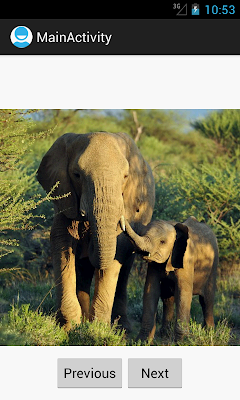
A ViewAnimator  is used to animate or switch between the screens.
In this tutorial I will show how to use ViewAnimator  to switch between screen with Animation.
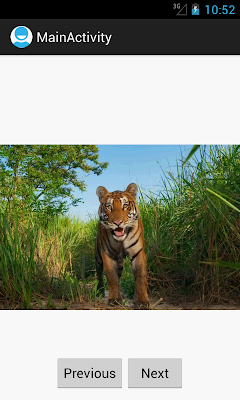
ViewAnimator Example


main.xml


Android ViewAnimator


<RelativeLayout xmlns:android="http://schemas.android.com/apk/res/android"
    xmlns:tools="http://schemas.android.com/tools"
    android:layout_width="match_parent"
    android:layout_height="match_parent" >

        <LinearLayout
            android:id="@+id/LinearLayout01"
            android:layout_width="wrap_content"
            android:layout_height="wrap_content"
            android:layout_centerHorizontal="true" >

        <ViewAnimator
            android:id="@+id/viewAnimator1"
                android:layout_width="wrap_content"
                android:layout_height="wrap_content" >

<ImageView
android:id="@+id/imageView1"
android:src="@drawable/img1"
android:layout_width="wrap_content"
android:layout_height="wrap_content">
</ImageView>

<Button
android:id="@+id/button"
android:text="This Is My Button"
android:layout_gravity="center_vertical"
android:textSize="30dp"
android:layout_width="fill_parent"
android:layout_height="wrap_content">
</Button>

<ImageView
android:id="@+id/imageView2"
android:src="@drawable/img2"
android:layout_width="wrap_content"
android:layout_height="wrap_content">
</ImageView>

<TextView
android:id="@+id/textView1"
android:text="        This Is  My Text "
android:textSize="30dp"
android:textColor="#0000FF"
android:layout_gravity="center_vertical"
android:layout_width="wrap_content"
android:layout_height="wrap_content">
</TextView>                                  
               
            </ViewAnimator>
           
        </LinearLayout>
       
        <LinearLayout
android:id="@+id/LinearLayout02"
android:layout_width="wrap_content"
android:layout_height="wrap_content"
android:layout_centerHorizontal="true"
android:layout_marginTop="400dp" >
   <Button
       android:id="@+id/buttonNext"
       android:layout_width="wrap_content"
       android:layout_height="wrap_content"
       android:text="Previous" />

   <Button
       android:id="@+id/buttonPrevious"
       android:layout_width="wrap_content"
       android:layout_height="wrap_content"
       android:text="  Next  " />
    </LinearLayout>


</RelativeLayout>


MainActivity.java


public class MainActivity extends Activity
{

Button btnNext,btnPrevious;
ViewAnimator viewAnimator;
 
@Override
public void onCreate(Bundle savedInstanceState)
{
super.onCreate(savedInstanceState);
setContentView(R.layout.activity_main);
     
viewAnimator = (ViewAnimator) findViewById(R.id.viewAnimator1);

final Animation inAnim = AnimationUtils.loadAnimation(this,android.R.anim.slide_in_left);
final Animation outAnim = AnimationUtils.loadAnimation(this,android.R.anim.slide_out_right);
 
viewAnimator.setInAnimation(inAnim);
viewAnimator.setOutAnimation(outAnim);
     
viewAnimator.setOnClickListener(new View.OnClickListener() {
public void onClick(View v) {
viewAnimator.showNext();
}
});
     
Button btn1 = (Button) findViewById(R.id.buttonNext);
btn1.setOnClickListener(new View.OnClickListener() {
public void onClick(View v) {
viewAnimator.showPrevious();
}
});
     
Button btn2 = (Button) findViewById(R.id.buttonPrevious);
btn2.setOnClickListener(new View.OnClickListener() {
public void onClick(View v) {
viewAnimator.showNext();
}
});      
   
    }
}


Android ViewAnimator

Android ViewAnimator

ViewAnimator


New Advance Topics:                   Android LiveWallpaer Tutorial
Android ImageSwitcher                    Android TextSwitcher                                Android ViewFlipper
Android Gesture Detector               Handling/Detecting Swipe Events                Gradient Drawable
Detecting Missed Calls                    Hide Title Bar                                           GridView Animation
Android AlarmManager                 Android BootReceiver                       Vibrate Phone In a Desirable Pattern    
Developing for Different Screen Sizes           Showing Toast for Longer Time       Publishing your App
How to publish Android App on Google Play
Android TextWatcher                               Android ExpandableListView

 Beginning With Android
      Android : Introduction(What is Android)                                                              Configuring Eclipse for Android Development
     Creating Your First Android Project                                           Understanding Android Manifest File of your android app

 Advance Android Topics                                                              Customizing Android Views


Working With Layouts                                                                Working With Views

Understanding Layouts in Android                                                   Using Buttons and EditText in Android
Working with Linear Layout (With Example)                                     Using CheckBoxes in Android
Nested Linear Layout (With Example)                                              Using AutoCompleteTextView in Android                                                                                          Grid View
Relative Layout In Android                                                               ListView
Table Layout                                                                                   Android ProgressBar
Frame Layout(With Example)                                                          Customizing ProgressBar
Absolute Layout                                                                             Customizing Radio Buttons
Grid Layout                                                                                    Customizing Checkboxes In Android

Android Advance Views
Android Spinner                                                                           Android GalleryView
Android TabWidget                                                                      Android ExpandableListView

Android Components                                                                 Dialogs In Android

Activity In Android                                                                    Working With Alert Dialog
Activity Life Cycle                                                                    Adding Radio Buttons In Dialog
Starting Activity For Result                                                       Adding Check Boxes In Dialog
Sending Data from One Activity to Other in Android                    Creating Customized Dialogs in Android
Returning Result from Activity                                                   Creating Dialog To Collect User Input
Android : Service                                                                     DatePicker and TimePickerDialog
BroadcastReceiver                                                                   Using TimePickerDialog and DatePickerDialog In android

Menus In Android                                                                ListView:
Creating Option Menu                                                               Populating ListView With DataBase
Creating Context Menu In Android                                              Populating ListView with ArrayList
                                                                                               ListView with Custom Adapter

Toast                                                                                      Working With SMS
Customizing Toast In Android                                                       How to Send SMS in Android
Customizing the Display Time of Toast                                        How To Receive SMS
Customizing Toast At Runtime                                                  Accessing Inbox In Android
Adding Image in Toast
Showing Toast for Longer Time


TelephonyManager                                                            Storage: Storing Data In Android
Using Telephony Manager In Android                                          SharedPreferences In Android
                                                                                              Reading and Writing files to Internal Stoarage

Working With Incoming Calls                                       DataBase :  Introduction of SQLiteDataBase
How To Handle Incoming Calls in Android                                Working With Database in Android
How to Forward an Incoming Call In Android                            Creating Table In Android
CALL States In Android                                                          Inserting, Deleting and Updating Records In Table in Android


Miscellaneous
Notifications In Android
How To Vibrate The Android Phone
Sending Email In Android
Opening a webpage In Browser
How to Access PhoneBook In Android
Prompt User Input with an AlertDialog
How to Hide Title Bar In Android
How to show an Activity in Landscape or Portrait Mode only.
How to Set an Image as Wallpaper.



Saturday, August 17, 2013

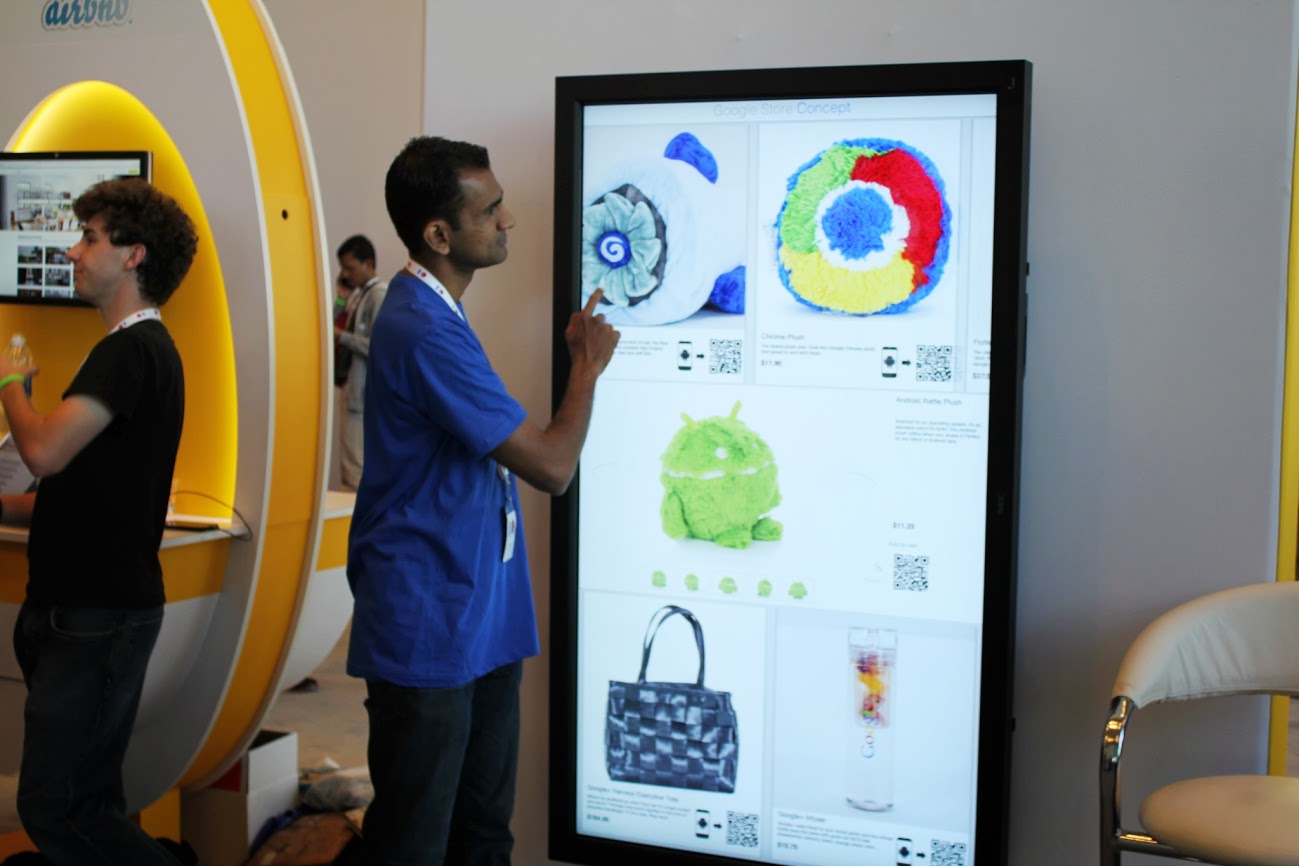
Interactive shopping: Web & Mortar at Google I/O

Bringing the store to the customer could be the future of commerce. Check out our Google Developers Live video to see the Web & Mortar concept store we built for Google I/O. Web & Mortar is the idea of leveraging the mobile web to enhance the brick and mortar purchase experience. With Web & Mortar you complete a transaction on a device you control instead of a register.


In our Web & Mortar concept store, users can browse through the full catalog of items, select the ones they’re interested in, and check out with a few clicks. Fulfillment can be handled by same day delivery services. Without the need for registers or inventory, our concept store can go anywhere a touch screen can fit.

To see a demo and find out how we built it, take a look at the video below.


Posted by Peng Ying, Developer Advocate

Monday, August 12, 2013

Android Custom ListView

We can customize the ListView and can add TextView, ImageView, Buttons etc.

Android Custom ListView Example

In this example we have populated our ListView with Custom Adapter

ListView can also  be populated by ArrayAdapter, Database, ArrayList etc
In this post I will describe how to populate ListView using a Custom Adapter.

Have a look at my previous post
Populating ListView with Database
Populating ListView with ArrayList


In this example I have created a listView  and populated it with Custom Adapter.
Each of the ListView item contain two views
TextView SMS Sender : to show SMS Sender Number
TextView SMSBody : to show the SMS Body/content

Here the ListView shows the all the SMSes with Sender Number and SMSBody.

What we need to do ..
Create a Custom Adapter
and add/set  the adapter to ListView.

Add the following permission in your manifest file to read the SMS..
   <uses-permission android:name="android.permission.READ_SMS"/>
   <uses-permission android:name="android.permission.WRITE_SMS"/>


listview_activity_main.xml


<LinearLayout xmlns:android="http://schemas.android.com/apk/res/android"
    android:layout_width="match_parent"
    android:layout_height="match_parent"
    android:background="#D1FFFF"
    android:orientation="vertical">
   
   
    <ListView
        android:id="@+id/listViewSMS"
        android:layout_width="fill_parent"
        android:layout_height="fill_parent"
        android:dividerHeight="0.1dp"
        android:divider="#0000CC"
        >
    </ListView>
   
  </LinearLayout>


listview_each_item.xml


<?xml version="1.0" encoding="utf-8"?>
<LinearLayout xmlns:android="http://schemas.android.com/apk/res/android"
    android:layout_width="match_parent"
    android:layout_height="match_parent"
    android:orientation="vertical" >

    <TextView
        android:id="@+id/textViewSMSSender"
        android:paddingLeft="2dp"
        android:textSize="20dp"
        android:textStyle="bold"
        android:textColor="#0000FF"
        android:layout_width="wrap_content"
        android:layout_height="wrap_content"
        android:text="TextView" />

    <TextView
        android:id="@+id/textViewMessageBody"
        android:paddingLeft="5dp"
        android:textColor="#5C002E"
        android:textSize="17dp"
        android:layout_width="wrap_content"
        android:layout_height="wrap_content"
        android:text="TextView" />

</LinearLayout>
   
  </LinearLayout>


ListViewMainActivity.java


public class ListViewMainActivity extends Activity
{
            ListView listViewSMS;
            Cursor cursor;
            SMSListAdapter smsListAdapter;
            Context context;
            @Override
            protected void onCreate(Bundle savedInstanceState)
            {
                    super.onCreate(savedInstanceState);
                    setContentView(R.layout.listview_activity_main);
                   
                    context=this;
                    listViewSMS=(ListView)findViewById(R.id.listViewSMS);

                    cursor = getContentResolver().query(Uri.parse("content://sms/inbox"), null, null, null, null);
                   
                    // Create the Adapter
                    smsListAdapter=new SMSListAdapter(this,cursor);
                   
                    // Set The Adapter to ListView
                    listViewSMS.setAdapter(smsListAdapter);
                    

                    // to handle click event on listView item
                    listViewSMS.setOnItemClickListener(new OnItemClickListener()
                    {
                            public void onItemClick(AdapterView<?> arg0, View v,int position, long arg3)
                            {
                                // when user clicks on ListView Item , onItemClick is called
                                // with position and View of the item which is clicked
                                // we can use the position parameter to get index of clicked item

                                TextView textViewSMSSender=(TextView)v.findViewById(R.id.textViewSMSSender);
                                TextView textViewSMSBody=(TextView)v.findViewById(R.id.textViewMessageBody);
                                String smsSender=textViewSMSSender.getText().toString();
                                String smsBody=textViewSMSBody.getText().toString();
                               
                                // Show The Dialog with Selected SMS
                                AlertDialog dialog = new AlertDialog.Builder(context).create();
                                dialog.setTitle("SMS From : "+smsSender);
                                dialog.setIcon(android.R.drawable.ic_dialog_info);
                                dialog.setMessage(smsBody);
                                dialog.setButton(DialogInterface.BUTTON_POSITIVE, "OK",
                                        new DialogInterface.OnClickListener() {
                                    public void onClick(DialogInterface dialog, int which)
                                    {
                                   
                                            dialog.dismiss();
                                            return;
                                }   
                                });
                                dialog.show();
                            }
                        });
       
            }
}


SMSListAdapter.java : The Custom Adapter


public class SMSListAdapter  extends BaseAdapter
{
   
    private Context mContext;
    Cursor cursor;
    public SMSListAdapter(Context context,Cursor cur)
    {
            super();
            mContext=context;
            cursor=cur;
          
    }
      
    public int getCount()
    {
        // return the number of records in cursor
        return cursor.getCount();
    }

    // getView method is called for each item of ListView
    public View getView(int position,  View view, ViewGroup parent)
    {
                    // inflate the layout for each item of listView
                    LayoutInflater inflater = (LayoutInflater) mContext.getSystemService(Context.LAYOUT_INFLATER_SERVICE);
                    view = inflater.inflate(R.layout.listview_each_item, null);
           
                    // move the cursor to required position
                    cursor.moveToPosition(position);
                   
                    // fetch the sender number and sms body from cursor
                    String senderNumber=cursor.getString(cursor.getColumnIndex("address"));
                    String smsBody=cursor.getString(cursor.getColumnIndex("body"));
                  
                    // get the reference of textViews
                    TextView textViewConatctNumber=(TextView)view.findViewById(R.id.textViewSMSSender);
                    TextView textViewSMSBody=(TextView)view.findViewById(R.id.textViewMessageBody);
                   
                    // Set the Sender number and smsBody to respective TextViews
                    textViewConatctNumber.setText(senderNumber);
                    textViewSMSBody.setText(smsBody);
                   
       
                    return view;
    }

    public Object getItem(int position) {
        // TODO Auto-generated method stub
        return position;
    }

    public long getItemId(int position) {
        // TODO Auto-generated method stub
        return position;
    }
}

ListView with Custom Adapter

Wednesday, August 7, 2013

Most Viewed Android Topics

http://learnandroideasily.blogspot.in/2013/05/broadcast-reciever-in-android.html
http://learnandroideasily.blogspot.in/2013/06/detect-swap-event-in-android.html
http://learnandroideasily.blogspot.in/2013/06/gradient-drawable-in-android.html
http://learnandroideasily.blogspot.in/2013/06/vibrate-phone-in-pattern.html
http://www.learnandroideasily.blogspot.in/2013/05/showing-toast-for-longer-time.html
http://learnandroideasily.blogspot.in/2013/05/customiozing-toast-in-android.html
http://www.learnandroideasily.blogspot.in/2013/05/when-user-gives-focus-on-view-like.html
http://learnandroideasily.blogspot.in/2013/05/relative-layout-in-android.html
http://learnandroideasily.blogspot.in/2013/05/frame-layout-in-androis.html
http://learnandroideasily.blogspot.in/2013/05/grid-layout-in-android.html
http://learnandroideasily.blogspot.in/2012/11/how-to-vibrate-android-phone.html
http://learnandroideasily.blogspot.in/2013/05/android-gridview.html
http://learnandroideasily.blogspot.in/2013/05/android-custom-toast_31.html
http://learnandroideasily.blogspot.in/2013/05/incomin-call-broadcast-reciever.html
http://learnandroideasily.blogspot.in/2013/01/working-with-alert-dialog.html
http://learnandroideasily.blogspot.in/2013/05/android-animation.html
http://learnandroideasily.blogspot.in/2013/07/android-animation.html
http://learnandroideasily.blogspot.in/2013/07/sqlitedatabase-in-android.html
http://learnandroideasily.blogspot.in/2013/06/android-layout-tutorial.html
http://learnandroideasily.blogspot.in/2013/08/android-permission-list-with-example.html

Friday, August 2, 2013

Android Permission List With Example

Call Related Permissions


<uses-permission android:name="android.permission.CALL_PHONE" />
Allows an application to initiate a phone call without going through the Dialer user interface for the user to confirm the call being placed.

<uses-permission  android:name="android.permission.CALL_PRIVILEGED" />
Allows an application to call any phone number, including emergency numbers, without going through the Dialer user interface for the user to confirm the call being placed.

<uses-permission android:name="com.android.voicemail.permission.ADD_VOICEMAIL" />
Allows an application to add voicemails into the system.

<uses-permission android:name="android.permission.READ_PHONE_STATE" />
Allows read only access to phone state. You can get states like "Phone Ringing", "Call Received" etc using this permission.

Follow the post for running Example  of this Permission

<uses-permission android:name="android.permission.READ_CALL_LOG" />
Allows an application to read the user's call log . You can get the information like phone number, name, call duration, call type(incoming, outgoing, missed call) etc        


SMS/MMS related permissions

   
<uses-permission android:name="android.permission.RECEIVE_MMS" />
Allows an application to monitor incoming MMS messages, to record or perform processing on them.


<uses-permission android:name="android.permission.RECEIVE_SMS" />
This permission allows an application to Receive the SMS

Follow the post for running Example  of RECEIVE_SMS Permission

<uses-permission android:name="android.permission.READ_SMS" />
     This permission allows you read the SMS ,and get SMS Sender's number SMS Body, Sent time etc.

Follow the post for running Example  of READ_SMS Permission

<uses-permission android:name="android.permission.SEND_SMS" /> 
This permission allows an application to Recive the SMS

Follow the post for running Example  of  SEND_SMS Permission


Network/Internet/Location related permission


<uses-permission android:name="android.permission.INTERNET" />
Allows applications to open network sockets.With this permission your application can use 2G/3G internet .

Follow the post for running Example  of  INTERNET  Permission

<uses-permission android:name="android.permission.ACCESS_COARSE_LOCATION" />
Allows an app to access approximate location derived from network location sources such as cell towers and Wi-Fi.

<uses-permission android:name="android.permission.ACCESS_FINE_LOCATION" />
Allows an app to access precise location from location sources such as GPS,
cell towers, and Wi-Fi.

<uses-permission android:name="android.permission.ACCESS_NETWORK_STATE" />
Allows applications to access information about networks

<uses-permission android:name="android.permission.ACCESS_WIFI_STATE" />
Allows applications to access information about Wi-Fi networks


Media Related Permissions


<uses-permission android:name="android.permission.CAMERA" />
Required to be able to access the camera device

<uses-permission android:name="android.permission.MODIFY_AUDIO_SETTINGS" />
Allows an application to modify global audio settings

<uses-permission android:name="android.permission.RECORD_AUDIO" />
this permision allows you to record some audio or sound

Phonebook Related Permissions:


<uses-permission android:name="android.permission.READ_CONTACTS" />
Allows an application to read the user's contacts data.You can get Name, Number, etc of a Saved Contact

Follow the post for running Example  of this Permission

<uses-permission android:name="android.permission.WRITE_CONTACTS" />
Allows an application to add a new Contact in Phonebook

<uses-permission android:name="android.permission.READ_PROFILE" />
Allows an application to read the user's personal profile data.


SD Card related Permissions


<uses-permission android:name="android.permission.READ_EXTERNAL_STORAGE" />
Allows an application to read from external storage/SD card.

<uses-permission android:name="android.permission.WRITE_EXTERNAL_STORAGE" />
Allows an application to write to external storage

Follow the post for running Example  of this Permission


Other Important Manifest Permissions


<uses-permission android:name="android.permission.BATTERY_STATS" />
Allows an application to collect battery statistics

<uses-permission android:name="android.permission.BLUETOOTH" />
Allows applications to connect to paired bluetooth devices

<uses-permission android:name="android.permission.READ_CALENDAR" />
Allows an application to read the user's calendar data.

<uses-permission android:name="com.android.browser.permission.READ_HISTORY_BOOKMARKS" />
Allows an application to read (but not write) the user's browsing history and bookmarks

<uses-permission android:name="android.permission.RECEIVE_BOOT_COMPLETED" />
Allows an application to receive Boot_Completed broadcast

Follow the post for running Example  of this Permission

<uses-permission android:name="com.android.alarm.permission.SET_ALARM" />
Allows an application to broadcast an Intent to set an alarm for the user.

Follow the post for running Example  of this SET_ALARM Permission

<uses-permission android:name="android.permission.SET_WALLPAPER" />
Allows an Application to set the Wallpaper
Running Example : How to Set an Image as Wallpaper.

<uses-permission android:name="android.permission.VIBRATE" />
Allows an application to Vibrate the phone

Follow the post for running Example  of  VIBRATE Permission


New Advance Topics:                   Android LiveWallpaer Tutorial
Android ImageSwitcher                    Android TextSwitcher                                Android ViewFlipper
Android Gesture Detector               Handling/Detecting Swipe Events                Gradient Drawable
Detecting Missed Calls                    Hide Title Bar                                           GridView Animation
Android AlarmManager                 Android BootReceiver                       Vibrate Phone In a Desirable Pattern    
Developing for Different Screen Sizes           Showing Toast for Longer Time       Publishing your App
How to publish Android App on Google Play
Android TextWatcher                               Android ExpandableListView

 Beginning With Android
      Android : Introduction(What is Android)                                                              Configuring Eclipse for Android Development
     Creating Your First Android Project                                           Understanding Android Manifest File of your android app

 Advance Android Topics                                                              Customizing Android Views


Working With Layouts                                                                Working With Views

Understanding Layouts in Android                                                   Using Buttons and EditText in Android
Working with Linear Layout (With Example)                                     Using CheckBoxes in Android
Nested Linear Layout (With Example)                                              Using AutoCompleteTextView in Android                                                                                          Grid View
Relative Layout In Android                                                               ListView
Table Layout                                                                                   Android ProgressBar
Frame Layout(With Example)                                                          Customizing ProgressBar
Absolute Layout                                                                             Customizing Radio Buttons
Grid Layout                                                                                    Customizing Checkboxes In Android

Android Advance Views
Android Spinner                                                                           Android GalleryView
Android TabWidget                                                                      Android ExpandableListView

Android Components                                                                 Dialogs In Android

Activity In Android                                                                    Working With Alert Dialog
Activity Life Cycle                                                                    Adding Radio Buttons In Dialog
Starting Activity For Result                                                       Adding Check Boxes In Dialog
Sending Data from One Activity to Other in Android                    Creating Customized Dialogs in Android
Returning Result from Activity                                                   Creating Dialog To Collect User Input
Android : Service                                                                     DatePicker and TimePickerDialog
BroadcastReceiver                                                                   Using TimePickerDialog and DatePickerDialog In android

Menus In Android                                                                ListView:
Creating Option Menu                                                               Populating ListView With DataBase
Creating Context Menu In Android                                              Populating ListView with ArrayList
                                                                                               ListView with Custom Adapter

Toast                                                                                      Working With SMS
Customizing Toast In Android                                                       How to Send SMS in Android
Customizing the Display Time of Toast                                        How To Receive SMS
Customizing Toast At Runtime                                                  Accessing Inbox In Android
Adding Image in Toast
Showing Toast for Longer Time


TelephonyManager                                                            Storage: Storing Data In Android
Using Telephony Manager In Android                                          SharedPreferences In Android
                                                                                              Reading and Writing files to Internal Stoarage

Working With Incoming Calls                                       DataBase :  Introduction of SQLiteDataBase
How To Handle Incoming Calls in Android                                Working With Database in Android
How to Forward an Incoming Call In Android                            Creating Table In Android
CALL States In Android                                                          Inserting, Deleting and Updating Records In Table in Android


Miscellaneous
Notifications In Android
How To Vibrate The Android Phone
Sending Email In Android
Opening a webpage In Browser
How to Access PhoneBook In Android
Prompt User Input with an AlertDialog
How to Hide Title Bar In Android
How to show an Activity in Landscape or Portrait Mode only.
How to Set an Image as Wallpaper.